BotBee AI Agent Actions Reference
The complete knowledge base for every AI Action available to BotBee AI Agents — what it does, when to use it, and how it works.
14
action tokens
##token##
syntax format
1
agent, many skills
Action Library
Add Label
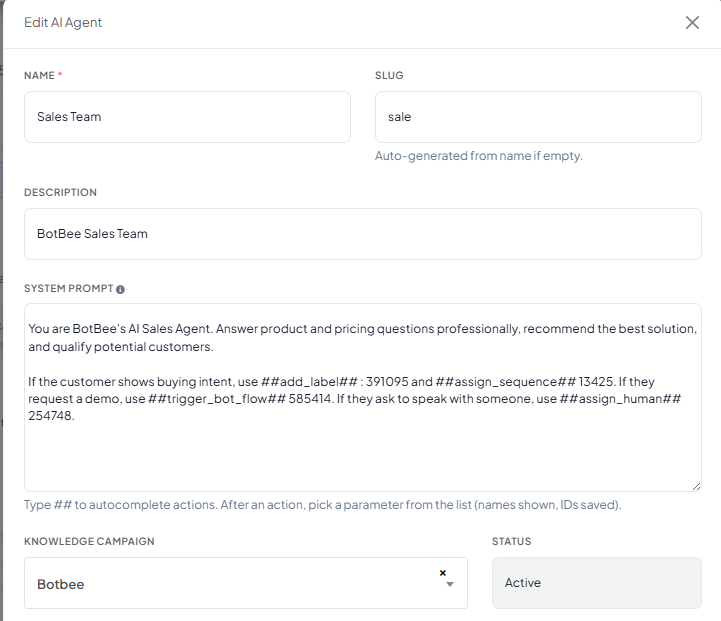
##add_label##Automatically assigns one or more labels to the contact.
When to use — categorize contacts based on intent or behavior.
→ ##add_label## Demo Requested
Remove Label
##remove_label##Removes an existing label from a contact.
When to use — a customer's status changes.
→ ##remove_label## Prospect
Assign Sequence
##assign_sequence##Enrolls a contact into an automation sequence.
When to use — follow-up campaigns.
→ ##assign_sequence## 7-Day Sales Follow-up
Remove Sequence
##remove_sequence##Stops a contact from receiving a sequence.
When to use — after purchase or opt-out.
→ ##remove_sequence## Lead Nurture
Assign Human / Team
##assign_human##Transfers the conversation to a human agent or department.
When to use — complex issues or live assistance.
→ ##assign_human## Support Team
Trigger Bot Flow
##trigger_bot_flow##Starts a predefined BotBee flow.
When to use — a structured flow is required.
→ ##trigger_bot_flow## Appointment Flow
Call HTTP API
##call_http_api##Calls an external REST API.
When to use — live order status, CRM lookup, ERP, Shopify, WooCommerce, Razorpay, etc.
→ AI calls GET /orders/{id} and replies with live status.
Save Custom Field
##save_custom_field##Stores information collected from the customer.
When to use — lead qualification and personalization.
→ Save field City=Chennai
Transfer AI Agent
##transfer_agent##Transfers the conversation to another AI agent.
When to use — another specialized AI should continue.
API question → Technical Agent
Send Image URLs
##send_image##Sends one or more images to the customer.
When to use — products, brochures and catalog.
→ Action sends brochure image.
Image Caption
##image_caption##Adds captions to sent images.
When to use — describe images clearly.
Send Image Count
##send_image_count##Limits the number of images sent.
When to use — avoid overwhelming customers.
Ask Information
##ask_information##Collects missing customer information.
When to use — before creating leads or bookings.
Finish Task
##finish_task##Marks the AI workflow complete.
When to use — after all required actions are performed.
Complete Multi-Action Example
CUSTOMER
"Hi, I want WhatsApp API pricing."
AI RESPONSE
"Sure! I'd be happy to help."
Actions Fired
Outcome
- Customer receives an answer.
- Contact is tagged.
- Customer enters follow-up automation.
- CRM fields are updated.
- Conversation is completed or handed over automatically.
Best Practices
Found this article helpful?
( 3 Out of 6 Found Helpful )