RCS Business Messaging Onboarding – Checklist (BotBee)
Use this checklist to ensure you have all required details ready before starting your RCS onboarding with BotBee. Completing everything correctly helps avoid verification delays or rejections.
1. Brand & Company Information
- ☐ Brand Display Name (shown to users)
Example: BotBee - ☐ Legal Business Name (for contracts & invoicing)
Example: BotBee AI Labs - ☐ Brand Website URL
Example: https://www.botbee.io - ☐ Company Description (max 100 characters)
Example: AI-powered chatbot and messaging automation platform - ☐ Industry Type
Example: Conversational AI / SaaS / Technology
2. Contact Person Details
- ☐ Contact Person First Name
- ☐ Contact Person Last Name
- ☐ Designation
- ☐ Corporate Email ID (must match website domain)
Example: name@yourcompany.com - ☐ Contact Mobile Number (with country code)
3. Business Address Information
- ☐ Address Line 1
- ☐ Address Line 2 (if applicable)
- ☐ City
- ☐ State / Province
- ☐ ZIP / Postal Code
- ☐ Country
4. Legal & Policy URLs
- ☐ Privacy Policy URL
Example: https://yourdomain.com/privacy-policy - ☐ Terms of Service URL
Example: https://yourdomain.com/terms-of-service
5. Brand Assets (Images & Documents)
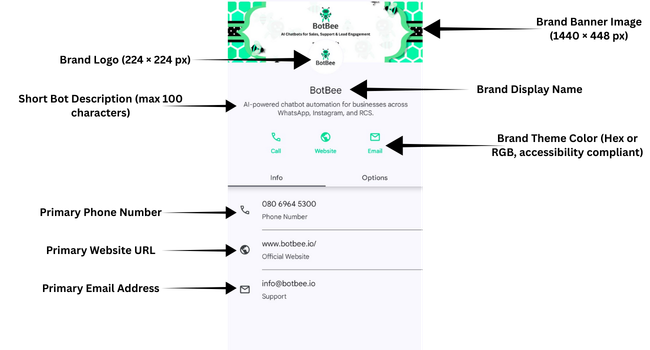
- ☐ Brand Logo (224 × 224 px)
- ☐ Brand Banner Image (1440 × 448 px)
- ☐ Business Registration Document (GST / CIN / MSME, etc.)
- ☐ Contact Person PAN Card
6. RCS Bot Identity Details
- ☐ Bot Name (max 40 characters)
Example: BotBee - ☐ Short Bot Description (max 100 characters)
Example: AI-powered chatbot automation for business messaging - ☐ Brand Theme Color (Hex or RGB, accessibility compliant)
Example: #2DDE98
7. Business Profile Contact Details (Shown to Users)
- ☐ Primary Phone Number
Example: +91 8069645300 - ☐ Phone Label (optional)
Example: Support - ☐ Primary Email Address
Example: info@yourdomain.com - ☐ Email Label (optional)
Example: Support - ☐ Primary Website URL
Example: https://www.yourdomain.com - ☐ Website Label
Example: Official Website
8. Opt-In Collection Method (Mandatory)
- ☐ Description of how users give consent
- ☐ Website form URLs (if applicable)
- ☐ App or chatbot opt-in flow explanation
- ☐ QR code or offline opt-in method (if used)
Example Opt-In Sources:
- Website registration forms
- WhatsApp chatbot onboarding
- Lead capture landing pages
- QR codes at physical locations
- API-based CRM consent
9. Message Trigger Details
- ☐ Explanation of what triggers messages
- ☐ Transactional events (orders, OTPs, payments)
- ☐ User actions (form submission, inquiries)
- ☐ Promotional campaigns (with consent)
- ☐ Reminder events (renewals, appointments)
10. Interaction Types Supported
Primary Interactions
- ☐ Lead generation
- ☐ Customer support & FAQs
- ☐ Product or service information
- ☐ Transactional alerts & OTPs
- ☐ Appointment booking
Secondary Interactions
- ☐ Surveys & feedback
- ☐ Promotional campaigns
- ☐ Payment collection & invoices
- ☐ Handover to WhatsApp or human agents
11. Opt-Out Message (Required)
- ☐ STOP keyword supported
- ☐ Auto-reply confirmation message configured
You have successfully opted out and will no longer receive messages from BotBee.
To reactivate, reply START or contact us at info@botbee.io.
12. Brand KYC & Verification Documents
- ☐ Legal business name verification document
- ☐ Business address proof
- ☐ Any additional documents requested by the RCS provider
Final Review Before Submission
- ☐ All mandatory fields completed
- ☐ All documents uploaded
- ☐ URLs accessible and live
- ☐ Opt-in process clearly explained
Found this article helpful?
( 4 Out of 8 Found Helpful )