Automating Telegram Group Management
Managing a Telegram group manually can become difficult as the number of members grows. Moderating spam, monitoring messages, and sending announcements can take a lot of time.
With BotBee, you can automate many of these tasks such as filtering spam messages, moderating content, managing members, and scheduling announcements.
In this guide, we will walk through the step-by-step process of automating a Telegram group using BotBee.
Step 1: Initial Setup:
Before configuring automation, you need to connect your Telegram bot to your group.
If you haven't done this yet, check out our previous guide: Integrating a Telegram bot into your group
Or watch this youtube video: https://youtu.be/HVRKwA6niNM
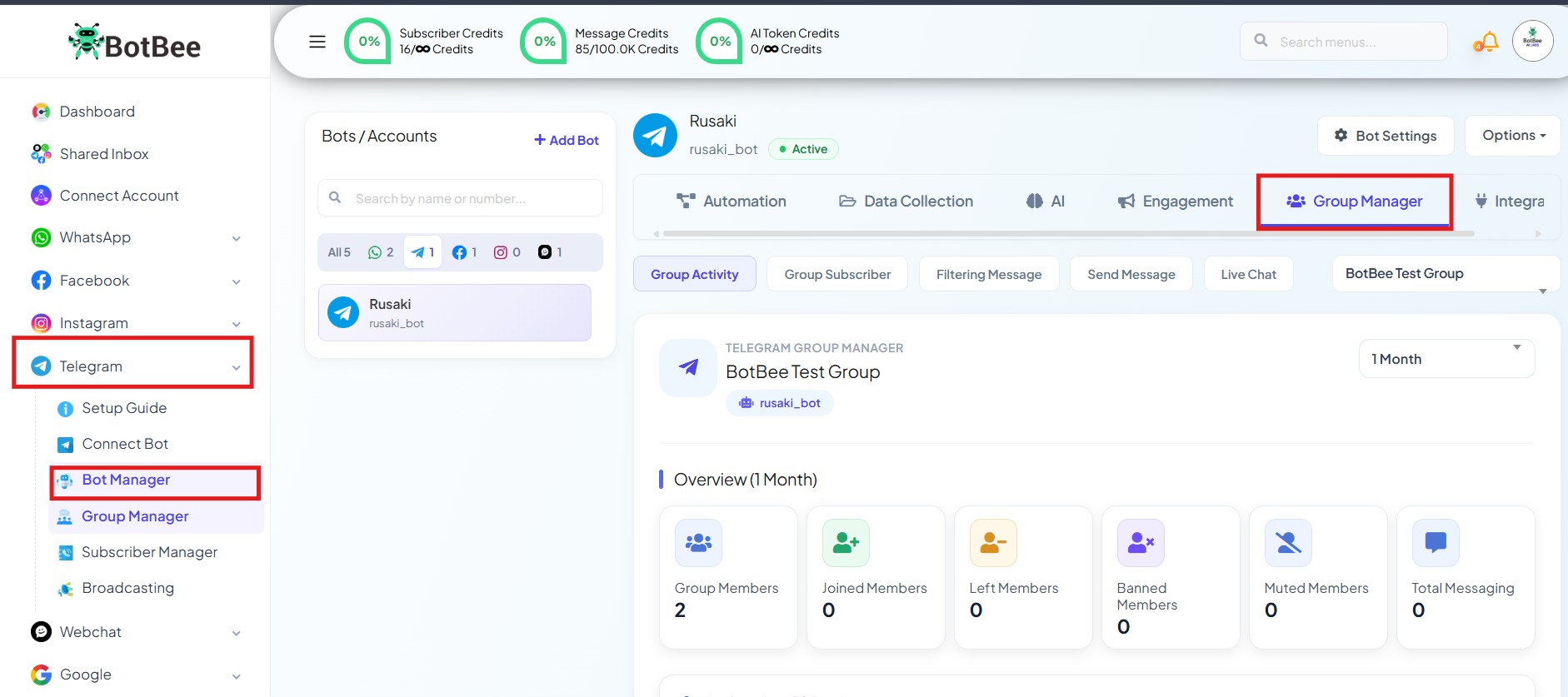
Step 2: Navigate to Group Manager:
- Log in to your BotBee dashboard.
- Navigate to the Group Manager section in Bot Manager.
- This is where you will configure all the automation settings.
Step 3: Monitor Group Activity:
BotBee allows you to monitor group activity directly from the dashboard.
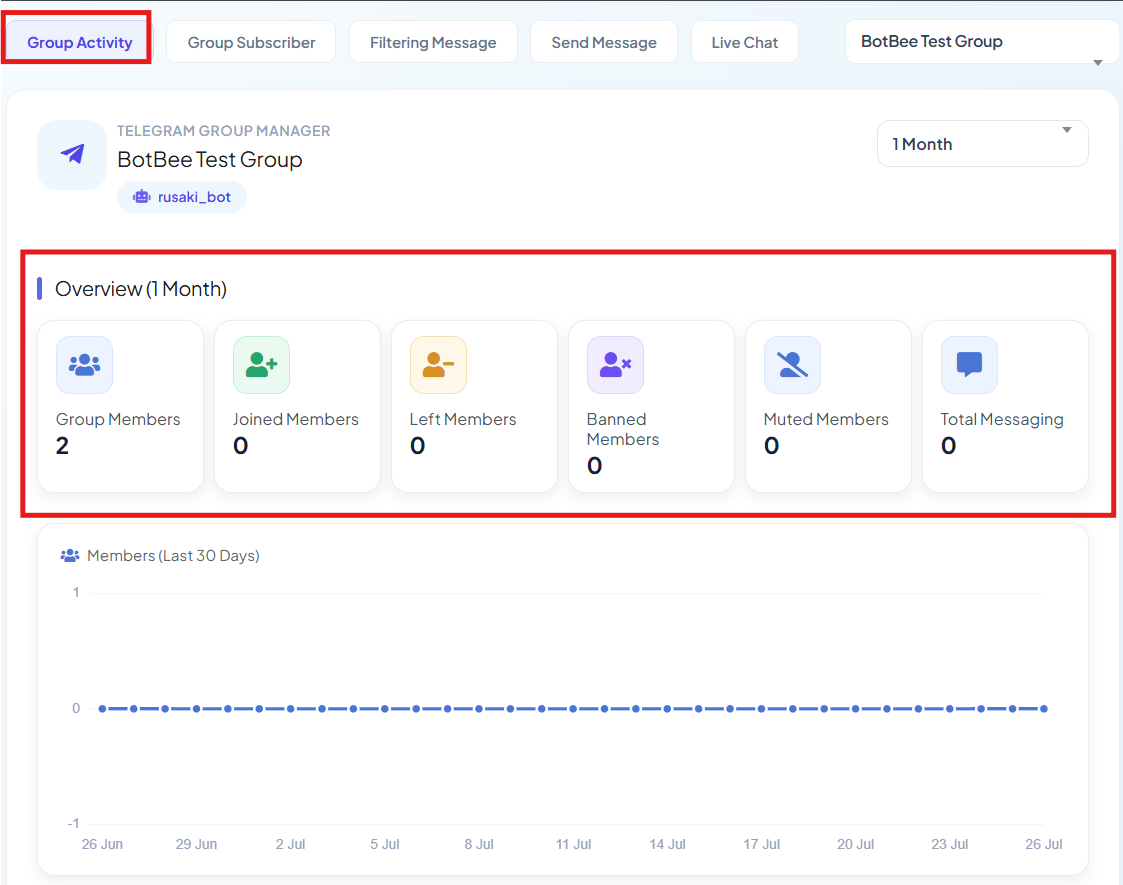
Group Activity:
In the Group Activity tab, you can view key statistics such as:
- Total number of members
- Recently joined members
- Overall group activity
This helps administrators track how the community is growing.
Group Subscribers:
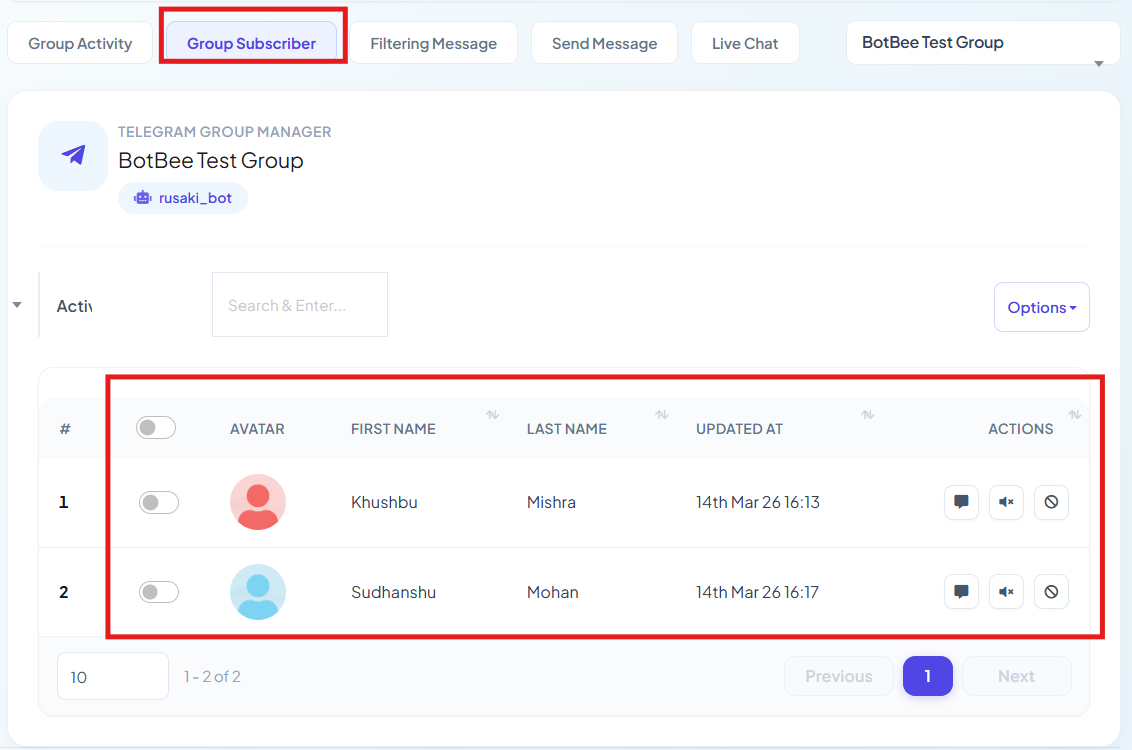
The Group Subscribers tab provides detailed information about group members.
From this section you can:
- View messages sent by specific users
- Mute subscribers for a certain period
- Ban users who violate group rules
- This makes moderation much easier.
Step 4: Configure Message Filtering (Automation):
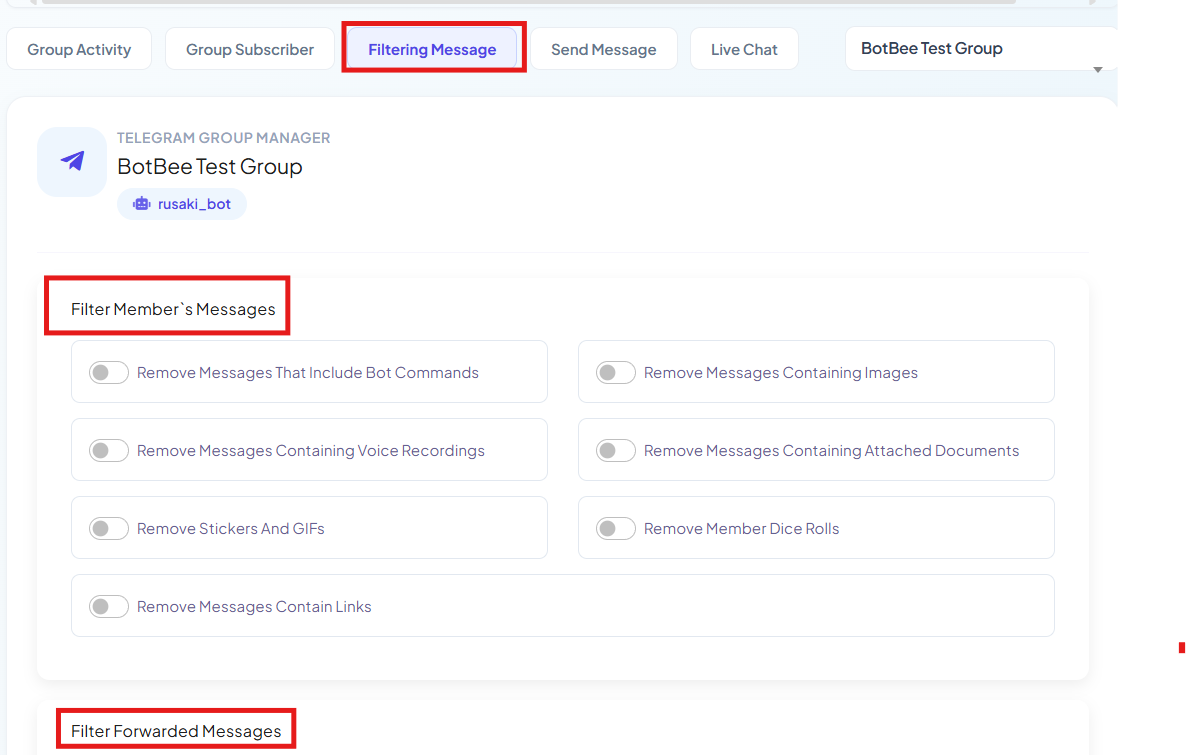
The main automation features are located in the Filter Message section.
Here you can enable automatic filtering to remove unwanted content from the group.
Bot Commands:
- You can automatically remove messages that start with /.
- This prevents members from triggering unnecessary bot commands in the group.
Media Filtering:
- BotBee can automatically delete different types of media messages such as: Images, Voice recordings, Stickers, GIFs, Dice rolls
- This helps keep the conversation focused on text discussions.
Link Filtering:
- Spam links are common in large Telegram groups.
- By enabling Link Filtering, BotBee will automatically remove messages that contain URLs.
Forwarded Content Filtering:
You can also filter out:
- Forwarded messages
- Forwarded media
- Forwarded links
- This prevents irrelevant or spam content from being shared in the group.
Step 5: Advanced Management Features:
BotBee also provides several advanced moderation tools.
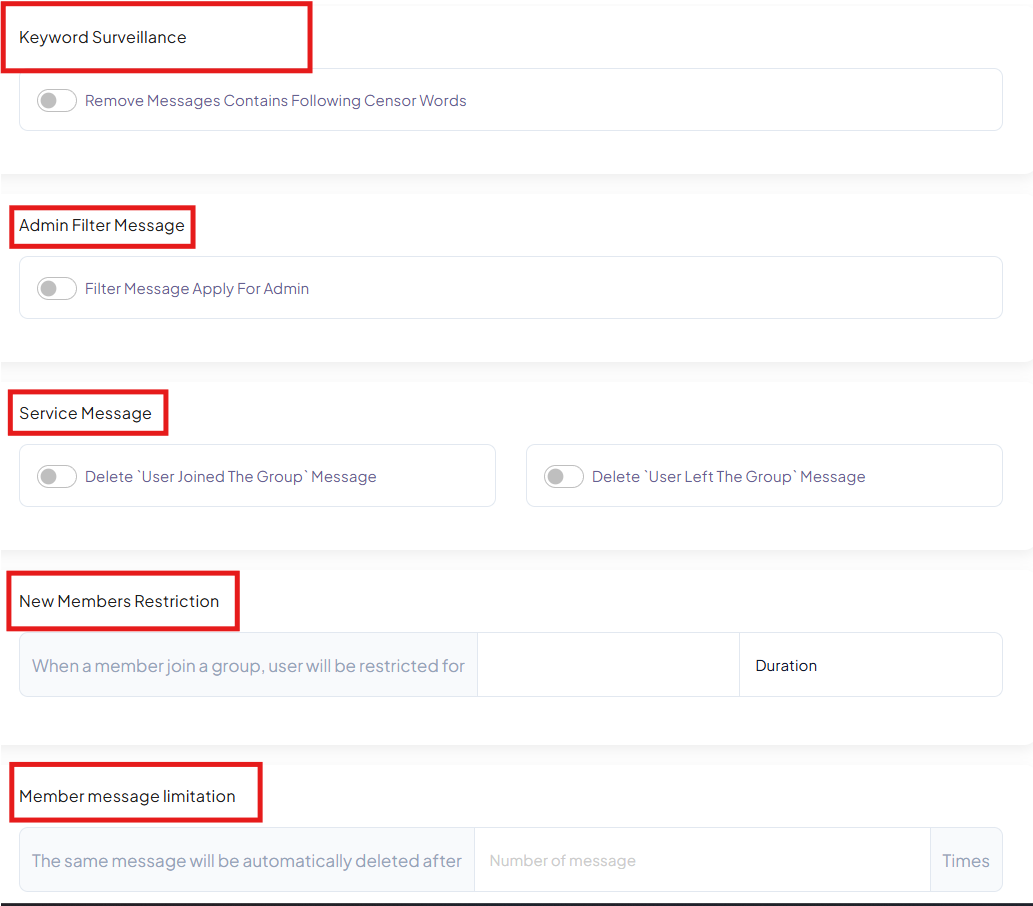
Keyword Surveillance:
- You can create a list of blacklisted words.
- If a user sends a message containing any of these words:
- The message will automatically be removed.
- This feature helps enforce community rules and maintain respectful conversations.
Service Messages:
- BotBee allows you to automatically delete these service messages to keep the chat clean.
Member Restrictions:
- You can apply restrictions to new members, such as:
- Preventing them from sending messages for a specific duration
- Setting message limits for members
- This helps prevent spam from newly joined accounts.
Admin Filter (Testing Mode):
- BotBee includes an Admin Filter Message option.
- When this feature is enabled: The bot will also filter messages sent by the admin.
- This is useful for testing whether the automation settings are working correctly.
- After testing, it is recommended to turn this option off.
Step 6: Broadcasting and Scheduling Messages:
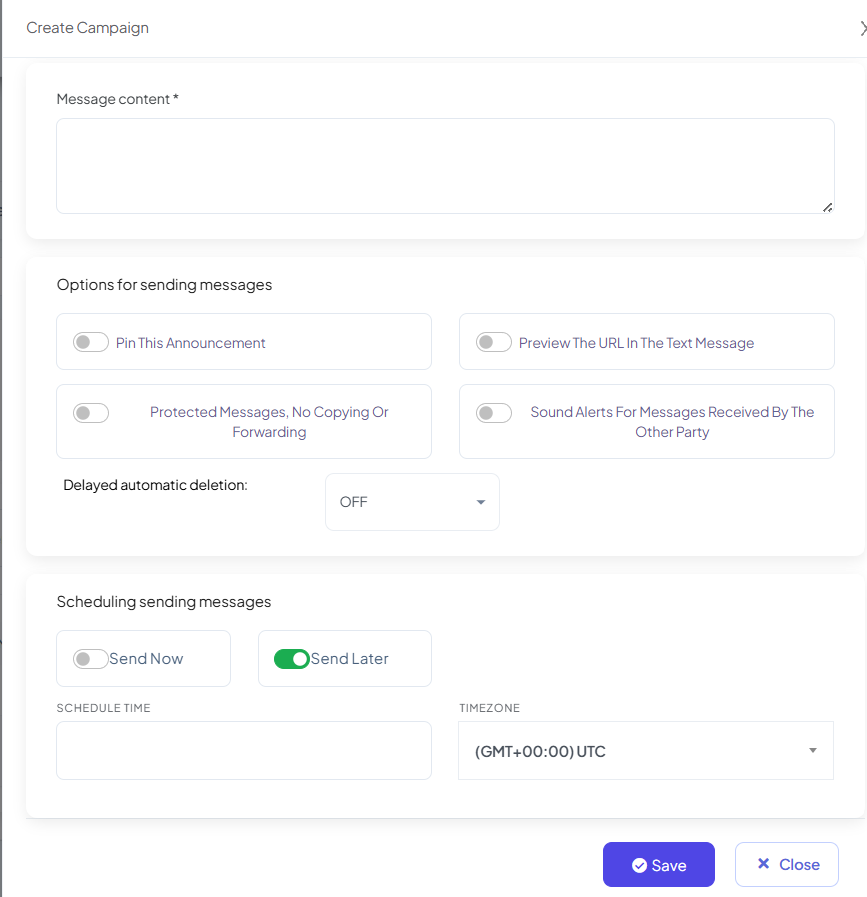
- BotBee also allows group admins to send announcements directly from the dashboard.
- Send Message: Go to the Send Message tab to create a message for the group.
- Announcements: You can choose to pin the message automatically so that it stays at the top of the chat.
- Scheduling: Messages can be: Sent immediately or Scheduled for a specific time
Automating a Telegram group with BotBee helps administrators manage communities more efficiently. With features like message filtering, keyword surveillance, member restrictions, and scheduled announcements, you can maintain a clean and well-organized group without constant manual moderation.
By setting up these automation tools, you can focus more on engaging with your community while BotBee handles routine moderation tasks.
Reference Video:
If you prefer video tutorials here are the links:
English: https://youtu.be/irx-VfBWF2Q
Still Need Help?
If you face difficulties during onboarding:
- Take a screenshot or screen recording.
- Share details with our support team.
Our team will review the onboarding step and guide you further.
Contact: 08069645300
Found this article helpful?
( 3 Out of 6 Found Helpful )